
DLL Sideloading - beyond classic DLL Hijacking - Red team diaries

Author
Krystian Piwowarczyk
Incidents involving trusted, vendor-signed Windows applications behaving strangely are increasingly common and difficult to explain. Traditional exploit indicators are often absent, binaries remain signed, and security tools generate only low-confidence alerts. This disconnect stems from how modern applications legitimately use dynamic loading and DLL search order.
This article explains how classic DLL hijacking evolved into search order abuse and DLL Sideloading rooted in extensibility, plugin systems, and auxiliary modules. It shows why trusted applications amplify risk, how attackers leverage intended behavior rather than vulnerabilities, and what defenders and developers can do to detect and reduce exposure without breaking real-world workflows.
From classic DLL Hijacking to modern reality
Why did dropping a single DLL used to be enough to gain execution, and why does that mental model fail so often today?
Early DLL hijacking thrived on implicit trust and loose defaults. When a Windows executable called LoadLibrary() without a fully qualified path, the operating system followed a predictable search order. On older versions of Windows, the current working directory sat high in that order, ahead of system locations. If an application launched from a writable directory—such as a user’s Downloads folder or a network share—any DLL with a matching name placed there would be loaded automatically.
Third-party applications amplified the problem. Many legacy installers unpacked binaries into user-writable paths or relied on helper DLLs without specifying absolute paths. A common pattern involved extracting a ZIP archive containing an EXE and its dependencies, then launching it directly. Attackers only needed to add a malicious version.dll or winmm.dll to the same directory. No exploit code was required; Windows behaved exactly as designed.
Microsoft incrementally raised the bar. SafeDllSearchMode, enabled by default since Windows XP SP2, pushed the current working directory lower in the search order. The KnownDLLs mechanism, implemented via HKLM\SYSTEM\CurrentControlSet\Control\Session Manager\KnownDLLs, short-circuited loading for core system libraries by mapping them directly from trusted locations. Protected directories like C:\Windows\System32 became non-writable for standard users, eliminating the most obvious replacement attacks.
These changes didn’t remove DLL loading risks; they changed where those risks live. Attackers shifted focus away from system components and toward large, extensible applications that intentionally load optional modules. Collaboration tools, VPN clients, endpoint agents, and engineering software all rely on dynamic loading to remain flexible. The abuse moved from “drop a DLL next to an EXE” to influencing which of several legitimate search paths gets checked first.
A critical misconception persists among defenders: that failed proof-of-concept hijacks mean the class of issue is gone. In practice, many attempted hijacks fail precisely because modern applications hard-code paths or embed manifests. The remaining successful cases are quieter, tied to plugins, auxiliary modules, and search order decisions that were never meant to be adversarially controlled.
Understanding DLL Search Order in legitimate extensibility
Why do well-designed applications still rely on behavior that looks risky under a security lens?
Dynamic loading is foundational to modern Windows software. Applications load libraries at runtime to support optional features, third-party plugins, language packs, and hardware-specific functionality. An engineering tool might load a GPU-specific renderer only if a compatible driver is detected. An enterprise client might scan for extensions that integrate with other products. Hard-coding every dependency at build time would make these designs brittle and unmaintainable.
At the API level, this typically involves calls such as:
LoadLibraryExW(L"plugin.dll", NULL, LOAD_WITH_ALTERED_SEARCH_PATH);
or delayed imports resolved when a feature is first used. Developers often rely on relative paths because the installation layout or plugin ecosystem is expected to vary. A common pattern is scanning a directory tree, reading configuration files, or enumerating registry keys under HKLM\Software\Vendor\App\Plugins.
The risk appears when assumptions about control break down. If a plugin directory lives under %AppData% or %ProgramData%, standard users can often write to it. If the application prepends that directory to its DLL search path using SetDllDirectory(), every subsequent load inherits that preference. Even without explicit manipulation, relative paths resolve against the process’s working directory, which may be inherited from a parent process the developer never considered.
There is an unavoidable tension here. Locking DLL loading to absolute paths under Program Files increases safety but reduces flexibility. Vendors competing in crowded markets often prioritize extensibility, allowing customers to drop custom modules into known folders. Those decisions are rational in isolation, yet they create predictable resolution logic that can be influenced without exploiting memory or bypassing signatures.

Trusted Applications as an unexpected attack surface
What changes when the process doing the loading is implicitly trusted by people and tools?
Code signing establishes integrity, not intent. When an executable is signed by a reputable vendor and chains to a trusted root certificate, operating systems, administrators, and security products treat it differently. Application allowlists explicitly permit its execution. EDR platforms suppress alerts from it to reduce noise. Network controls may grant it broader egress based on business necessity.
This trust becomes an amplifier. Influencing behavior without modifying the signed binary sidesteps many controls. The executable remains unchanged, its signature intact. What changes is the environment it operates in: which directories it searches, which optional modules it finds, and which code paths it activates.
Security tools often struggle here because their heuristics are built around exploit artifacts: shellcode, unsigned payloads, suspicious API sequences. A trusted process loading a DLL from a user profile may be logged but scored as low risk because similar behavior occurred during legitimate plugin installation. Over time, baselining logic learns that “this app loads lots of DLLs” and stops asking where they come from.
The result is a blind spot. Incidents only surface when secondary effects appear—unexpected network traffic, lateral process creation, or data access patterns that don’t align with business use. By then, responders face a difficult attribution problem: everything involved is technically allowed.
Search Order Hijacking through plugins and auxiliary modules
How does search order abuse differ from the hijacking most people learned about?
In this context, search order hijacking means influencing which legitimate-looking module an application loads by controlling directory precedence, not replacing a known system DLL. The target is often an auxiliary component: a renderer, codec, telemetry helper, or feature toggle module that the application conditionally loads.
Consider an application that searches for analytics.dll in the following order:
- %AppData%\Vendor\App\Extensions
- C:\Program Files\Vendor\App\Extensions
This ordering supports per-user extensions, but it also means a module in the user profile wins. If that DLL exports the expected functions, the application proceeds normally. Advanced cases involve proxying: the loaded DLL forwards most exports to the real implementation while adding side effects.
At a high level, export forwarding relies on the PE export table. A proxy DLL can declare:
ExportedFunction = realmodule.ExportedFunction
while executing its own initialization code in DllMain(). This technique is used legitimately by compatibility shims and wrappers, making it indistinguishable at a glance.
The hardest part for defenders is the absence of obvious breakage. The UI works. Features behave as expected. No crashes occur. Only deep inspection - enumerating loaded modules with tools like Process Explorer v17.05 or correlating ETW Microsoft-Windows-Kernel-Process events reveals that a module came from an unexpected path.
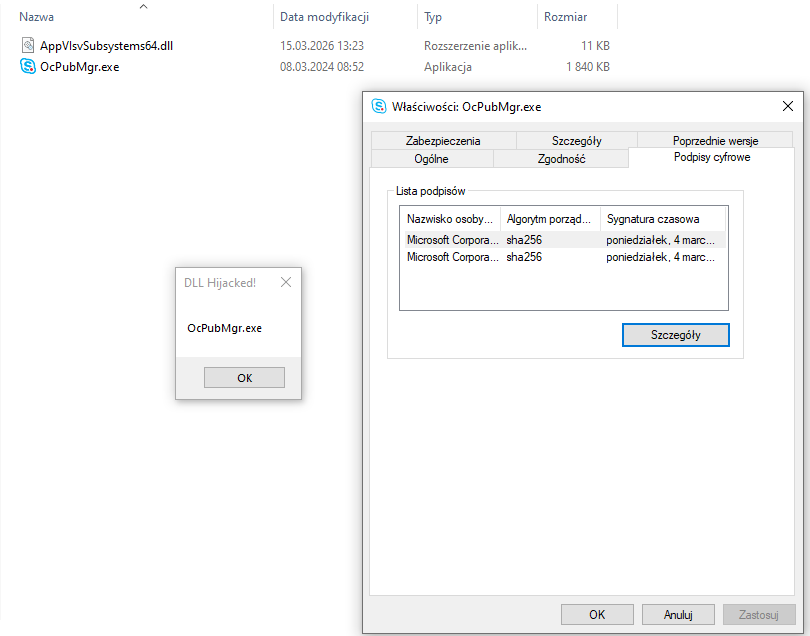
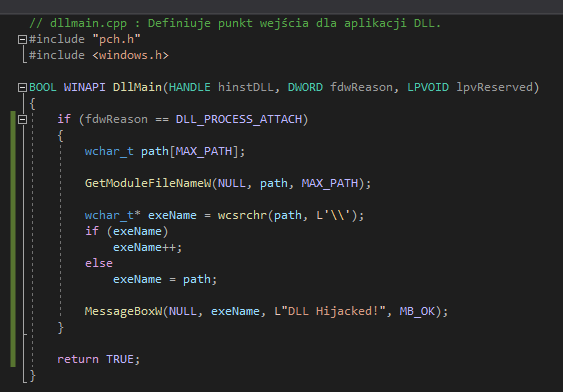
The 'Bring Your Own Binary': hunting for undocumented sideloads
While much of the defense focus remains on securing applications already installed on a target endpoint, advanced adversaries have shifted toward a more proactive "Bring Your Own Binary" (BYOB) strategy. In this tradecraft, the attacker does not rely on a pre-existing vulnerability on the victim's machine. Instead, they bundle a legitimate, digitally signed executable from a well-known vendor (such as Microsoft, Google, or NVIDIA) with their own malicious DLL.
When the attacker drops this package onto a system, security software sees a trusted, validly signed process starting up. Because the EXE is signed by a reputable entity, it often bypasses aggressive heuristic scanning or application allowlisting. Once executed, the signed process follows its internal logic to load the attacker's DLL from the local directory, effectively "sideloading" the malware into a trusted memory space.
To streamline defense and research, projects like HijackLibs provide an excellent, curated repository of known vulnerable executables. However, for a sophisticated attacker, HijackLibs is just the starting point. There is a vast ocean of undocumented sideloading opportunities in the wild. Finding a "fresh" candidate - a signed binary that hasn't been flagged by researchers yet is relatively simple for those using tools like Process Monitor (ProcMon) to identify NAME NOT FOUND results during DLL load events.
This tactic turns the concept of code signing on its head. The signature, intended to be a mark of trust, becomes a mask that hides the malicious intent of the code running alongside it.
Next 'Red team diaries' article will cover automated finding undocumented and signed binaries with DLL Sideloading issues. An intermediate-level attacker can find dozens of such executables in just a few hours. Writing a malicious DLL file these days takes just fifteen minutes with LLM.
Detection challenges for defenders
Why do traditional detections struggle, and what actually works?
Most detection pipelines prioritize exploit signals. Unsigned binaries, memory injection, suspicious parent-child relationships, and known malware hashes drive alerts. Search order abuse inside a trusted process produces none of these. Telemetry exists - Windows logs module loads, but it is rarely promoted to a high-fidelity signal.
Actionable investigation starts with asking different questions. Instead of “is this binary malicious?”, ask “is this binary loading modules from places it normally doesn’t?” or “is this binary in the right place?” or even “how this binary get into this host?” Useful signals include:
- DLL loads from %AppData%, %Temp%, or user profile paths by enterprise software
- Modules not present on clean reference systems with the same version installed
- Load order differences after application updates or configuration changes
A practical incident response approach looks like this:
- Capture loaded module lists using tasklist /m or EDR telemetry
- Compare against a known-good system with identical application version
- Review vendor documentation for supported plugin locations
- Check filesystem ACLs on discovered directories
- Correlate module load times with behavioral anomalies
Reducing exposure through design and configuration
How do you reduce risk without breaking legitimate extensibility?
For developers, safer loading starts with specificity. Prefer absolute paths and constrain search behavior using modern flags. When dynamic loading is required, APIs like LoadLibraryEx() with LOAD_LIBRARY_SEARCH_APPLICATION_DIR or LOAD_LIBRARY_SEARCH_SYSTEM32 reduce ambiguity. Explicit allowlists for plugin directories prevent accidental inheritance of unsafe paths.
Environment hardening complements design changes. Enterprises can restrict write access to plugin directories, disable unused extension mechanisms, and review application configurations during deployment. A simple checklist helps:
- Audit trusted applications that support plugins or extensions
- Identify all directories they search for modules
- Verify ACLs prevent standard user writes where not required
- Document expected module lists per version
- Monitor deviations as investigation triggers
On the detection side, targeted visibility matters more than blanket alerting. Logging module loads for a small set of highly trusted processes and flagging unusual paths provides context-rich signals without overwhelming analysts.
Conclusion
The story of DLL hijacking didn’t end; it evolved. Crude techniques gave way to subtle abuse of legitimate design decisions. Signed, trusted applications didn’t become safer by default - they became more attractive targets because their behavior blends into the background.
- Classic “drop a DLL next to an EXE present in the system” attacks rarely work on modern Windows systems, but DLL loading risks remain embedded in extensibility.
- Trust in signed software amplifies impact, allowing behavior changes without modifying protected binaries.
- Finding undocumented signed executables with DLL Sideloading is trivial to attackers.
- Search order hijacking leverages design choices, not exploits, and often leaves no obvious forensic scars.
- Effective detection relies on contextual awareness of where modules come from, not just what they are.
- Secure loading practices, hardened configurations, and focused monitoring significantly reduce exposure.
The next step is practical: inventory the trusted applications in your environment, map how they load modules, and decide which behaviors are intentional versus accidental. Incorporate those findings into threat modeling, detection engineering, and software design reviews. The goal isn’t to eliminate extensibility - it’s to understand it well enough that “nothing is compromised” no longer feels like the end of the conversation.
Related Posts
All posts
Get your three regular assessments for free now!
- All available job profiles included
- Start assessing your candidates' skills right away
- No time restrictions - register now, use your free assessments later
- All available job profiles included
- Start assessing your candidates' skills right away
- No time restrictions - register now, use your free assessments later